

Agent Health
Optimizing Agent Performance

Beyond the general metrics, the Agent Health page provides specific data points you can use to refine your Agent's "Brain" and reduce human workload.
Top and Worst Performing QAs
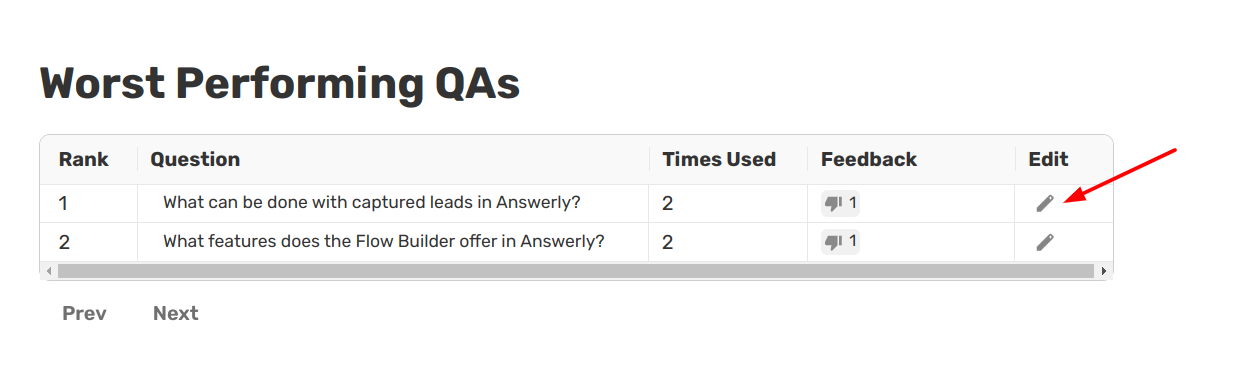
Answerly ranks your approved facts based on how often they are used and the feedback they receive.
- Top Performing: These are your most useful facts. They handle the bulk of your traffic and successfully resolve user issues.
- Worst Performing: This list identifies facts that might be confusing or lead to negative feedback. You should click Edit on these entries to clarify the answer or refine the question phrasing.
Analyzing Human Escalations
The Conversations Leading to Human Escalation section is one of your best tools for growth. It shows you a "cropped" version of the exact moment the Agent failed to answer and the user requested a human.
By reviewing these snippets, you can identify exactly what information is missing from your Knowledge Hub.
Pro Tip: If you see a common theme in your escalations, simply create a new Fact in your Knowledge Hub to cover that topic. Next time, the Agent will handle it instead of escalating!
What’s Next?
With your Agent's health optimized, it's time to put it to work. Next, we will learn how to turn those conversations into growth by capturing lead information directly in the chat.